VerseGrip 位置控制教程
本教程演示了如何利用 VerseGrip 的旋转功能直接控制Inverse3 设备光标的位置,同时绕过 Unity 主线程以实现高频更新。
简介
与 入门指南 与图中所示的方法不同(该方法以标准更新频率 60Hz 运行),本教程旨在根据 VerseGrip 设备的旋转,以更高的频率(1~4kHz)动态调整Inverse3 光标的位置。
这是通过利用由触觉线程触发的 DeviceStateChanged 通过事件实现的。
设置
首先创建一个 Haptic Rig:GameObject >Haply > Haptic Rig (单手),具体步骤详见《入门指南》。
VerseGripPositionControl 组件
创建一个名为 VerseGripPositionControl.cs 新的 C# 脚本,并将其附加到 触觉起源 游戏对象上。
在 VerseGripPositionControl 在类中定义以下属性:
public Inverse3 inverse3;
public VerseGrip verseGrip;

[Range(0, 1)]
public float speed = 0.5f;

[Range(0, 0.2f)]
public float movementLimitRadius = 0.2f;

private Vector3 _targetPosition;
- inverse3:对Inverse3 设备的引用,通过Inspector进行设置。
- verseGrip:用于光标控制的 VerseGrip 设备的引用。
- 速度:光标的移动速度。
- movementLimitRadius:光标从其初始位置可移动的最大距离。
- _targetPosition:光标移动所指向的目标位置。
Awake 方法
在 Awake 在该方法中,注册 Ready 事件,以便根据Inverse3 设备的工作区中心来初始化光标的目标位置:
private void Awake()
{
    inverse3.Ready.AddListener((inverse3Controller, args) =>
    {
        _targetPosition = inverse3Controller.WorkspaceCenterLocalPosition;
    });
}
在设备准备就绪之前,由于尚未确定左右手配置,因此无法获取工作空间中心。
实现 OnDeviceStateChanged 方法,根据 VerseGrip 的旋转和按钮输入计算光标的目标位置:
private void OnDeviceStateChanged(object sender, VerseGripEventArgs args)
{
    var verseGrip = args.DeviceController;
    // Calculate the direction based on the VerseGrip's rotation
    var direction = verseGrip.Orientation * Vector3.forward;

    // Check if the VerseGrip button is pressed down
    if (verseGrip.GetButtonDown())
    {
        // Initialize target position
        _targetPosition = inverse3.CursorLocalPosition;
    }

    // Check if the VerseGrip button is being held down
    if (verseGrip.GetButton())
    {
        // Move the target position toward the grip direction
        _targetPosition += direction * (0.0001f * speed);

        // Clamp the target position within the movement limit radius
        var workspaceCenter = inverse3.WorkspaceCenterLocalPosition;
        _targetPosition = Vector3.ClampMagnitude(_targetPosition - workspaceCenter, movementLimitRadius)
            + workspaceCenter;
    }
    // Move cursor to new position
    inverse3.SetCursorLocalPosition(_targetPosition);
}
在 OnEnable 和 OnDisable 注册与注销 DeviceStateChanged 事件。
/// Subscribes to the DeviceStateChanged event.
private void OnEnable()
{
    verseGrip.DeviceStateChanged += OnDeviceStateChanged;
}

/// Unsubscribes from the DeviceStateChanged event.
private void OnDisable()
{
    verseGrip.DeviceStateChanged -= OnDeviceStateChanged;
}
游戏玩法
- 将Inverse3 设备固定好,并确保其有足够的移动空间。
- 进入播放模式(Play Mode),并按住Inverse3 光标。
- 旋转 VerseGrip,观察 Unity 场景中光标的移动,其方向与 VerseGrip 的朝向直接对应。
- 按下 VerseGrip 的按钮,Inverse3 的光标将沿 VerseGrip 旋转的方向移动,从而展示实时控制效果。
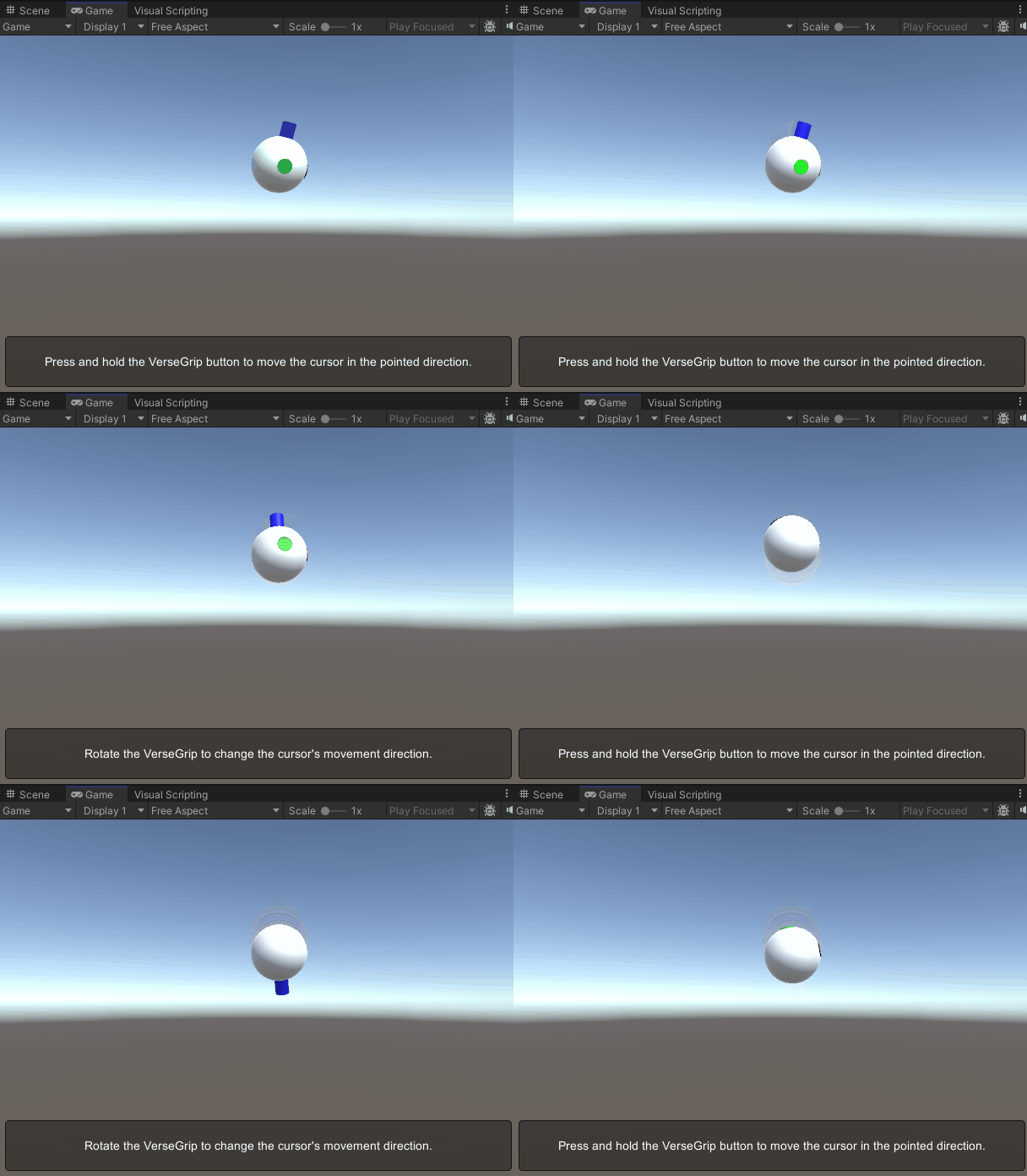
图片展示了光标模型,其前向轴已被高亮显示,以便清晰辨识。 有关自定义光标模型的更多详细信息,请参阅光标文档。
源文件
本示例中使用的最终场景及所有相关文件,均可从 Unity 包管理器中的“Tutorials”示例中导入。
VerseGripPositionControl.cs
/*
 * Copyright 2024 Haply Robotics Inc. All rights reserved.
 */

using Haply.Inverse.DeviceControllers;
using Haply.Inverse.DeviceData;
using UnityEngine;

namespace Haply.Samples.Tutorials._6_VerseGripPositionControl
{
    /// <summary>
    /// Demonstrates how to control the device cursor position using the VerseGrip.
    /// </summary>
    public class VerseGripPositionControl : MonoBehaviour
    {
        public Inverse3Controller inverse3;
        public VerseGripController verseGrip;

        [Tooltip("Cursor moving speed")]
        [Range(0, 1)]
        public float speed = 0.5f;

        [Tooltip("Maximum radius for cursor movement")]
        [Range(0, 0.1f)]
        public float movementLimitRadius = 0.075f;

        private Vector3 _targetPosition; // Target position for the cursor

        private void Awake()
        {
            inverse3.Ready.AddListener((inverse3Controller, args) =>
            {
                _targetPosition = inverse3Controller.WorkspaceCenterLocalPosition;
            });
        }

        /// <summary>
        /// Subscribes to the DeviceStateChanged event.
        /// </summary>
        private void OnEnable()
        {
            verseGrip.DeviceStateChanged += OnDeviceStateChanged;
        }

        /// <summary>
        /// Unsubscribes from the DeviceStateChanged event.
        /// </summary>
        private void OnDisable()
        {
            verseGrip.DeviceStateChanged -= OnDeviceStateChanged;
            inverse3.Release();
        }

        private void OnDeviceStateChanged(object sender, VerseGripEventArgs args)
        {
            var verseGrip = args.DeviceController;
            // Calculate the direction based on the VerseGrip's rotation
            var direction = verseGrip.Orientation * Vector3.forward;

            // Check if the VerseGrip button is pressed down
            if (verseGrip.GetButtonDown())
            {
                // Initialize target position
                _targetPosition = inverse3.CursorLocalPosition;
            }

            // Check if the VerseGrip button is being held down
            if (verseGrip.GetButton())
            {
                // Move the target position toward the grip direction
                _targetPosition += direction * (0.0001f * speed);

                // Clamp the target position within the movement limit radius
                var workspaceCenter = inverse3.WorkspaceCenterLocalPosition;
                _targetPosition = Vector3.ClampMagnitude(_targetPosition - workspaceCenter, movementLimitRadius)
                    + workspaceCenter;
            }
            // Move cursor to new position
            inverse3.SetCursorLocalPosition(_targetPosition);
        }
    }
}