力与位置的基础教程
本指南将介绍一个简单的演示,通过施加力来可视化Inverse3 光标的移动。 在本教程的最后,我们将模拟一种效果,仿佛Inverse3 被一根虚拟的橡皮筋连接到起始位置,同时一个球体GameObject将显示光标的位置。
前言
在《入门指南》中,Inverse3 介绍了对象及其功能,以及生成一定力的方法。 此处的目的是模拟光标上的橡皮筋效果。橡皮筋的工作原理与弹簧类似,其力受两端点之间的刚度和距离的双重影响。 因此,我们的目标是设计一个函数:当给定位置和刚度时,该函数能生成一种力,以抵抗光标远离原点的运动。
场景设置
从“GameObjects” > “Haply ”菜单中创建“Haptic Rig (one hand)”,然后开始。
ForceAndPosition 组件
触觉起源 选择 GameObject,ForceAndPosition.cs 添加一个名为的新脚本,并使用以下代码: ForceAndPosition 描述类:
[SerializeField]
private Inverse3 inverse3 = null;

[SerializeField, Range(0, 400)]
private float stiffness = 100;

private void OnDeviceStateChanged(object sender, Inverse3EventArgs args)
{
    var inverse3 = args.DeviceController;

    // Calculate the force.
    var force = (inverse3.WorkspaceCenterLocalPosition - inverse3.CursorLocalPosition) * stiffness;

    // Apply the force to the cursor.
    inverse3.SetCursorLocalForce(force);
}
在此代码片段中,将刚度设置为 100 牛顿每米(N/m),以模拟一个相对较软的弹簧。
此外,有一个属性用于返回工作区的中心,该属性是 inverse3.WorkspaceCenterLocalPosition 将引入该方法。
该方法通过从工作区中心减去光标位置来计算力,并将计算结果乘以刚度。
最后,inverse3.SetCursorLocalForce 使用该功能,将该力作用于光标上。
入门指南 正如其中所述,OnEnable 以及 OnDisable 在方法中 OnDeviceStateChanged 嵌入回调函数:
protected void OnEnable()
{
    inverse3.DeviceStateChanged += OnDeviceStateChanged;
}

protected void OnDisable()
{
    inverse3.DeviceStateChanged -= OnDeviceStateChanged;
}
游戏玩法
Inverse3 请拖动光标,启用“播放模式”,然后尝试操作设备。您会发现,移动光标时会产生一种力。 光标从起始位置移动得越远,这种力就越明显。
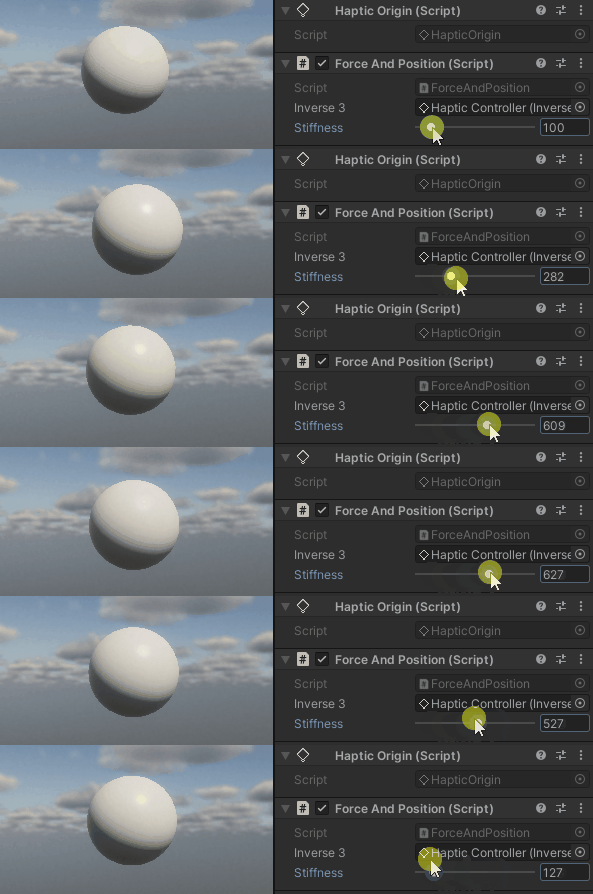
源文件
本示例中使用的最终场景及相关文件均可从 Unity包管理器中的“Tutorials”示例中导入。
ForceAndPosition.cs
/*
 * Copyright 2024 Haply Robotics Inc. All rights reserved.
 */

using Haply.Inverse.DeviceControllers;
using Haply.Inverse.DeviceData;
using UnityEngine;

namespace Haply.Samples.Tutorials._1_ForceAndPosition
{
    /// <summary>
    /// Demonstrates the application of force to maintain the cursor at its center position.
    /// </summary>
    public class ForceAndPosition : MonoBehaviour
    {
        public Inverse3Controller inverse3;

        [Range(0, 400)]
        // Stiffness of the force feedback.
        public float stiffness = 100;

        private void Awake()
        {
            inverse3 ??= FindObjectOfType<Inverse3Controller>();
        }

        /// <summary>
        /// Subscribes to the DeviceStateChanged event when the component is enabled.
        /// </summary>
        protected void OnEnable()
        {
            inverse3.DeviceStateChanged += OnDeviceStateChanged;
        }

        /// <summary>
        /// Unsubscribes from the DeviceStateChanged event and reset the force when the component is disabled.
        /// </summary>
        protected void OnDisable()
        {
            inverse3.DeviceStateChanged -= OnDeviceStateChanged;
            inverse3.Release();
        }

        /// <summary>
        /// Event handler that calculates and send the force to the device when the cursor's position changes.
        /// </summary>
        /// <param name="sender">The Inverse3 data object.</param>
        /// <param name="args">The event arguments containing the device data.</param>
        private void OnDeviceStateChanged(object sender, Inverse3EventArgs args)
        {
            var inverse3 = args.DeviceController;

            // Calculate the force.
            var force = (inverse3.WorkspaceCenterLocalPosition - inverse3.CursorLocalPosition) * stiffness;

            // Apply the force to the cursor.
            inverse3.SetCursorLocalForce(force);
        }
    }
}