动态场景中力反馈的教程
基于《基础力反馈教程》,本指南将介绍如何在 Unity 中模拟动态交互,使用户能够感受到来自移动物体的力反馈。 在此场景中,力反馈对高频更新的需求显得尤为突出。这一更新频率远高于 Unity 中视觉渲染的一般更新频率。
前言
要实现具有说服力的力反馈体验,特别是在动态场景中,以1kHz以上的频率进行计算至关重要。 这与通常以约60Hz运行的游戏更新循环有很大不同。 面临的挑战在于,如何在与主游戏循环并行处理这些高频更新时,确保线程安全的数据交换,从而维持一致且准确的力反馈。
基本力觉反馈设置的扩展
基本力觉反馈我们从教程中的场景设置开始。为了加入动态动作,SphereForceFeedback 调整脚本,使其能够响应球体的运动,并模拟与动态移动物体的交互。
主要变更点
- 动态物体的移动:集成基于用户输入或预定义运动模式来更新 Sphere 位置和速度的逻辑。
- 线程安全的数据交换:
ReaderWriterLockSlim用于管理主线程与力反馈线程之间对共享数据的并发访问。 - 力计算的调整:
SphereForceFeedback.ForceCalculation通过修改方法并考虑球体的速度,可以提供基于位置和运动两方面的逼真反馈。
动态交互
要模拟运动的球体,Update 您可以手动通过方法更新位置,也可以使用其他组件来根据键盘输入或其他交互来控制移动。
在此示例中,球体 游戏对象的名称为 移动球 更改为,教程 样本中包含 MovingObject 添加组件。
支持移动设备 ForceCalculation 的调整
在计算力觉反馈时,需要将“移动球体”的速度纳入考量,并根据交互的位置和速度来调整力。 这样可以获得更细腻、更逼真的力觉反馈,并能反映出交互的动态特性。
Vector3类型的方法参数otherVelocity添加force -= cursorVelocity * dampingをforce -= (cursorVelocity - otherVelocity) * damping替换为
private Vector3 ForceCalculation(Vector3 cursorPosition, Vector3 cursorVelocity, float cursorRadius,
    Vector3 otherPosition, Vector3 otherVelocity, float otherRadius)
{
    var force = Vector3.zero;

    var distanceVector = cursorPosition - otherPosition;
    var distance = distanceVector.magnitude;
    var penetration = otherRadius + cursorRadius - distance;

    if (penetration > 0)
    {
        // Normalize the distance vector to get the direction of the force
        var normal = distanceVector.normalized;

        // Calculate the force based on penetration
        force = normal * penetration * stiffness;

        // Calculate the relative velocity
        var relativeVelocity = cursorVelocity - otherVelocity;

        // Apply damping based on the relative velocity
        force -= relativeVelocity * damping;
    }

    return force;
}
线程安全的数据交换
在物体实时移动并相互作用的动态场景中,确保触觉反馈的计算始终基于最新数据,同时避免因并发访问导致的数据损坏,这一点至关重要。 因此,线程安全的数据交换变得不可或缺。
线程安全数据交换的主要概念
- 线程安全的机制:
ReaderWriterLockSlim使用该功能来管理并发数据访问。这样既可以支持多个读取操作,也可以支持单个写入操作,从而确保数据的一致性。 - 数据的读取与写入:
- 读取:触觉线程在读取锁的保护下读取对象的位置和速度。这样可以避免干扰数据的更新。
- 写入:主线程对对象数据的更新是在写锁的保护下进行的。这样可以防止因同时读写而导致数据状态不一致。
在 Unity 中的实现
-
场景数据结构体:为了便于进行线程安全操作,定义了一个用于存储所有必要场景数据的结构体。 该结构体包含“移动球体”、光标的位置和速度,以及各自的半径。 该数据结构将成为线程安全数据交换的基础。
private struct SceneData{public Vector3 ballPosition;public Vector3 ballVelocity;public float ballRadius;public float cursorRadius;}private SceneData _cachedSceneData; -
锁的初始化: 为了管理对场景数据的访问,
ReaderWriterLockSlim初始化实例。 通过此锁,多个线程可以同时读取数据,或者单个线程可以排他性地锁定数据以进行写入,从而确保了并发操作中的数据一致性。private ReaderWriterLockSlim _lock = new ReaderWriterLockSlim(); -
因写入锁定导致的缓存写入:
SaveSceneData该方法会在写锁的保护下更新场景数据。 这样,当某个线程正在更新数据时,其他线程将无法进行读写操作,从而防止数据冲突并确保数据一致性。private void SaveSceneData(){_cacheLock.EnterWriteLock();try{var t = transform;_cachedSceneData.ballPosition = t.position;_cachedSceneData.ballRadius = t.lossyScale.x / 2f;_cachedSceneData.cursorRadius = inverse3.Cursor.Radius;_cachedSceneData.ballVelocity = _movableObject.Velocity;}finally{_cacheLock.ExitWriteLock();}} -
通过读锁从缓存中读取数据:
GetSceneData该方法在读锁的保护下获取场景数据。 这样,多个线程就可以在不干扰写入操作的情况下安全地同时读取数据,从而确保触觉反馈的计算是基于最新的场景数据进行的。private SceneData GetSceneData(){_cacheLock.EnterReadLock();try{return _cachedSceneData;}finally{_cacheLock.ExitReadLock();}} -
主线程中的数据更新:
FixedUpdate该方法用于在主线程上定期更新场景数据。 这样,触觉反馈的计算就能始终访问最新数据,从而反映场景的动态特性。private void FixedUpdate(){SaveSceneData();} -
基于更新后的数据进行力计算的应用:
OnDeviceStateChanged在回调函数中,将使用通过线程安全方式获取的最新场景数据来计算力。这样可以确保力反馈的准确性,并保持对场景中动态交互的响应性。var sceneData = GetSceneData();var force = ForceCalculation(device.CursorLocalPosition, device.CursorLocalVelocity, sceneData.cursorRadius,sceneData.ballPosition, sceneData.ballVelocity, sceneData.ballRadius);
游戏体验
借助这些脚本的扩展功能,您可以与在场景中主动移动的球体进行交互。 触觉反馈会根据球体的运动轨迹动态变化,从而带来更沉浸式且触觉体验更丰富的体验。
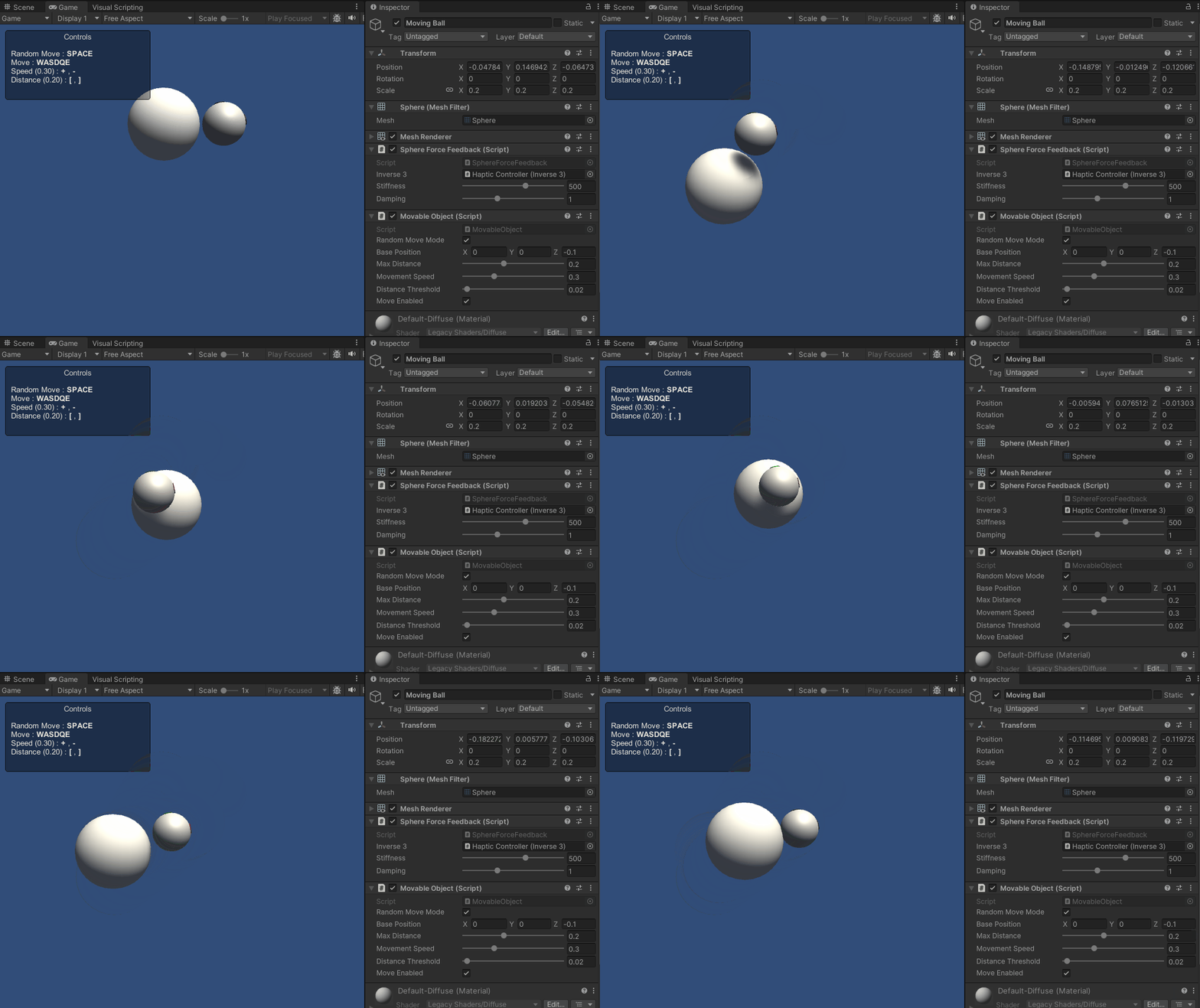
源文件
此示例中的场景及相关文件可从 Unity Package Manager 的“Tutorials”示例中导入。
教程 在示例中,有多个例子使用了
MovableObject其中包含脚本,可通过键盘输入控制已附加的游戏对象的移动。
SphereForceFeedback.cs
/*
* Copyright 2024 Haply Robotics Inc. All rights reserved.
*/
using System.Threading;
using Haply.Inverse.DeviceControllers;
using Haply.Inverse.DeviceData;
using Haply.Samples.Tutorials.Utils;
using UnityEngine;
namespace Haply.Samples.Tutorials._4A_DynamicForceFeedback
{
public class SphereForceFeedback : MonoBehaviour
{
// must assign in inspector
public Inverse3Controller inverse3;
[Range(0, 800)]
// Stiffness of the force feedback.
public float stiffness = 500f;
[Range(0, 3)]
public float damping = 1f;
#region Thread-safe cached data
/// <summary>
/// Represents scene data that can be updated in the Update() call.
/// </summary>
private struct SceneData
{
public Vector3 ballPosition;
public Vector3 ballVelocity;
public float ballRadius;
public float cursorRadius;
}
/// <summary>
/// Cached version of the scene data.
/// </summary>
private SceneData _cachedSceneData;
private MovableObject _movableObject;
/// <summary>
/// Lock to ensure thread safety when reading or writing to the cache.
/// </summary>
private readonly ReaderWriterLockSlim _cacheLock = new();
/// <summary>
/// Safely reads the cached data.
/// </summary>
/// <returns>The cached scene data.</returns>
private SceneData GetSceneData()
{
_cacheLock.EnterReadLock();
try
{
return _cachedSceneData;
}
finally
{
_cacheLock.ExitReadLock();
}
}
/// <summary>
/// Safely updates the cached data.
/// </summary>
private void SaveSceneData()
{
    _cacheLock.EnterWriteLock();
    try
    {
        var t = transform;
        _cachedSceneData.ballPosition = t.position;
        _cachedSceneData.ballRadius = t.lossyScale.x / 2f;

        _cachedSceneData.cursorRadius = inverse3.Cursor.Radius;

        _cachedSceneData.ballVelocity = _movableObject.Velocity;
    }
    finally
    {
        _cacheLock.ExitWriteLock();
    }
}
#endregion
/// <summary>
/// Saves the initial scene data cache.
/// </summary>
private void Start()
{
inverse3 ??= FindFirstObjectByType<Inverse3Controller>();
inverse3.Ready.AddListener((device, args) => SaveSceneData());
_movableObject = GetComponent<MovableObject>();
}
/// <summary>
/// Update scene data cache.
/// </summary>
private void FixedUpdate()
{
if (inverse3.IsReady)
{
SaveSceneData();
}
}
/// <summary>
/// Subscribes to the DeviceStateChanged event.
/// </summary>
private void OnEnable()
{
inverse3.DeviceStateChanged += OnDeviceStateChanged;
}
/// <summary>
/// Unsubscribes from the DeviceStateChanged event.
/// </summary>
private void OnDisable()
{
inverse3.DeviceStateChanged -= OnDeviceStateChanged;
inverse3.Release();
}
/// <summary>
/// Calculates the force based on the cursor's position and another sphere position.
/// </summary>
/// <param name="cursorPosition">The position of the cursor.</param>
/// <param name="cursorVelocity">The velocity of the cursor.</param>
/// <param name="cursorRadius">The radius of the cursor.</param>
/// <param name="otherPosition">The position of the other sphere (e.g., ball).</param>
/// <param name="otherVelocity">The velocity of the other sphere (e.g., ball).</param>
/// <param name="otherRadius">The radius of the other sphere.</param>
/// <returns>The calculated force vector.</returns>
private Vector3 ForceCalculation(Vector3 cursorPosition, Vector3 cursorVelocity, float cursorRadius,
Vector3 otherPosition, Vector3 otherVelocity, float otherRadius)
{
var force = Vector3.zero;
var distanceVector = cursorPosition - otherPosition;
var distance = distanceVector.magnitude;
var penetration = otherRadius + cursorRadius - distance;
if (penetration > 0)
{
// Normalize the distance vector to get the direction of the force
var normal = distanceVector.normalized;
// Calculate the force based on penetration
force = normal * penetration * stiffness;
// Calculate the relative velocity
var relativeVelocity = cursorVelocity - otherVelocity;
// Apply damping based on the relative velocity
force -= relativeVelocity * damping;
}
return force;
}
/// <summary>
/// Event handler that calculates and send the force to the device when the cursor's position changes.
/// </summary>
/// <param name="sender">The Inverse3 data object.</param>
/// <param name="args">The event arguments containing the device data.</param>
private void OnDeviceStateChanged(object sender, Inverse3EventArgs args)
{
var inverse3 = args.DeviceController;
var sceneData = GetSceneData();
// Calculate the moving ball force.
var force = ForceCalculation(inverse3.CursorLocalPosition, inverse3.CursorLocalVelocity, sceneData.cursorRadius,
sceneData.ballPosition, sceneData.ballVelocity, sceneData.ballRadius);
// Apply the force to the cursor.
inverse3.SetCursorLocalForce(force);
}
}
}